Bringing FEAGI-Powered Animation to Blender
By Ashu Sangar, Anna Plazek, and Nico Zeuss
For the past several months, our team has had the opportunity to work on creating a Python-based connector for FEAGI x Blender for Neuraville Inc. Blender, an open-source 3D modeling and animation software, which has gained mainstream popularity since its first release in 1995, provides users with an entire 3D pipeline including modeling, texturing, rigging, and animating. Our project sought to combine the capabilities afforded by Blender with FEAGI (Framework for Evolutionary Artificial General Intelligence), to enable neuromorphic, real-time control and animations of 3D models. This experience has been an enlightening look into the future of AI.
The Beginnings
We started out just getting comfortable working in Blender before being introduced to FEAGI. Our first task was to develop a starter script allowing us to interact with models using the Blender Python API or bpy. As our project largely revolved around animating, our team was primarily interacting with armatures or rigs - the skeletons of 3D models. As with real-life skeletons, armatures are composed of groups of bones, which can be manipulated by transformations like rotation, scale, and translation. Also like real-life skeletons, bones are limited by constraints (e.g. I should not be able to pull my arm 3 feet out of the shoulder socket to reach for a cookie). Additionally, armatures are rigged with inverse kinematics (IK) or forward kinematics (FK), which determine the order that transformations travel up or down bone chains. Without delving into more specifics, our team had to understand how armatures functioned and moved in order to make sense of the effects moving a singular bone had on the entire skeleton.
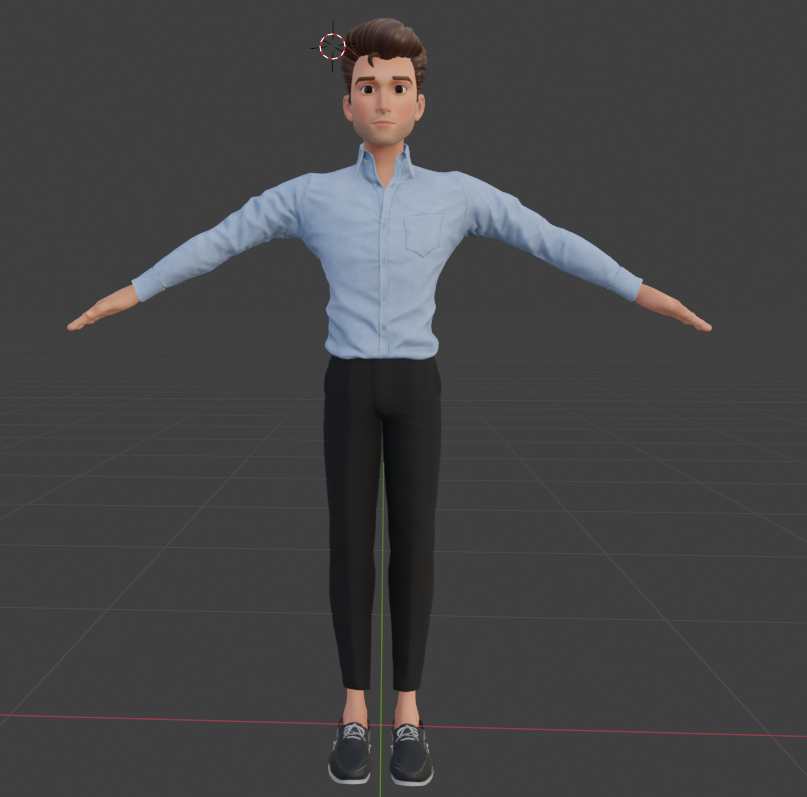
In terms of our starter script, key functionality included commands to transform, rotate, and scale a model, which allowed us to change its pose. Our team had a specific focus on manipulating roll, pitch, and yaw (Euler rotations), which are rotation around the x-axis, y-axis, and z-axis, respectively. These transformations became particularly significant in our future interactions with FEAGI gyros (more on this later). We also had various other functions implemented, including those for keyframing and the created keyframes. Keyframing is when important movements and transformations are set to a specific frame, allowing for interpolation between keyframes to animate the rig.
See the video below for an example of keyframing.
With our first milestone under our belts, the script we created would set the groundwork for the remainder of the project, which would revolve around the transformation of rigs in our communication with FEAGI.
Enter FEAGI
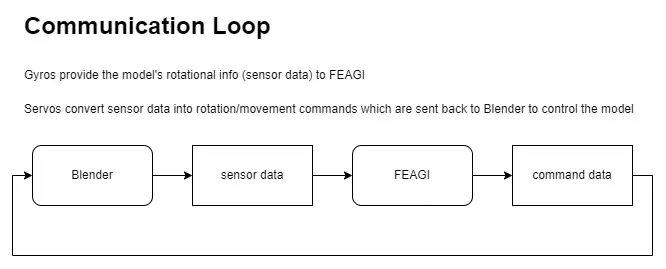
However, before we could send and receive data from FEAGI, we needed a communication schema for controlling each bone in the desired armature. To do this, our teammate Ashu undertook the daunting task of generating capabilities.
The "Generate Capabilities" functionality is a pipeline that iterates through every pose bone in a Blender armature, determines what kind of data each bone should provide or accept (sensor vs. actuator), and programmatically compiles this information into a JSON configuration tailored for the FEAGI AI framework. During this process, indexing schemes are calculated that specify how many entries each bone will have (e.g., a single gyro entry vs. multiple servo entries for each axis), dynamically computed value ranges (sometimes based on bone length or naming conventions), and consistency checks to make sure that the assigned indexes and ranges match across sensors and actuators. The result is a mapping where FEAGI can seamlessly request and send data to Blender in real time, allowing for near-instant updates to bone positions, rotations, and other properties. Overall, "Generate Capabilities" eliminates tedious manual configuration steps, unifies Blender and FEAGI in a cohesive workflow, and paves the way for scalable, AI-driven control of complex 3D models.
Below is the process of generating capabilities broken down into bullet points to give a simplified, step-by-step description:
- Discover Armatures and Bones:
- The script first finds all the armatures (skeleton structures) in the Blender scene.
- It then iterates over every bone within these armatures.
- Measure Bone Size:
- For each bone, the script measures the distance between its head and tail.
- This measurement is used to calculate how sensitive the bone should be when receiving sensor or actuator commands.
- Create Gyro Entries (Sensors):
- One gyro entry is generated for each bone.
- This entry provides rotational data from Blender back to FEAGI.
- The sensor range (max and min values) is computed dynamically using the bone's length to ensure each bone is read accurately.
- Create Servo Entries (Actuators):
- Three servo entries are created per bone (one for each axis: X, Y, and Z).
- These entries allow FEAGI to send directional commands to move or rotate the bone.
- The movement range for the servos is also computed based on the bone's length, ensuring consistent control.
- Indexing and Organization:
- Each bone's gyro and servo entries are indexed uniquely so that FEAGI knows exactly which data corresponds to which bone.
- A global counter is used for the servo entries to maintain unique identifiers across multiple armatures.
- Consistency Check:
- The script includes a step to verify that the computed ranges for gyro data match the corresponding servo data. This helps catch any errors or mismatches in the configuration before it is used.
- Export as JSON:
- Once all bones have been processed, the final configuration, including both sensor and actuator entries, is compiled into a structured JSON file.
Uh Oh Troubleshooting
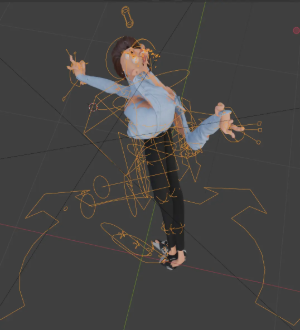
Given the complexity of that task, there were a variety of key difficulties the team encountered during the capabilities generation process. We had to account for situations where some bones required a single entry (e.g., one gyro sensor per bone) while others needed multiple entries (e.g. servo controls for separate axes). Managing this issue led to complex indexing challenges. Another indexing challenge occurred when multiple models were introduced into the Blender scene, and capabilities became unintentionally mixed between armatures. To solve this, we had to ensure that each bone in all armatures was mapped to a unique index to avoid any potential overlap. On FEAGI's end, it was also imperative to find a way to switch between armatures for precise control on demand.
Another significant issue that arose was ensuring data consistency as assigning different keys for gyros and servos led to mismatches in verification. As a result, FEAGI was not updating the model properly. The last challenge of generating capabilities arose from a functional shortcoming of Blender. Blender does not have a specified range in which a specific armature can rotate, so allowing for each bone to have a different range of rotation was difficult. The solution lay in basing the degree of rotation on bone length.
Reflecting and Looking Forwards
At this point in the project, we are able to successfully send real-time information from Blender to FEAGI, allowing us to confidently animate any Blender models (regardless of their rigging) with FEAGI using the controller. We have ensured compatibility through testing our controller with multiple Blender models.
While there is still much room for improvement, our team has made great strides this semester. The integration of FEAGI with Blender provides an avenue for neuromorphic AI to enhance interactivity and creativity. Our team is thankful to Neuraville for this opportunity, and we look forward to seeing the impact of our work.
This post was contributed by a member of the NRS community and reflects their own work and findings.