Boston Dynamics Spot
by Boston Dynamics
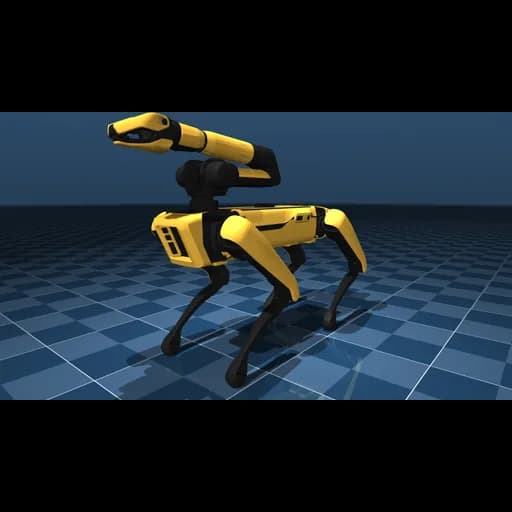
Boston Dynamics Spot is an agile mobile robot that navigates terrain with unprecedented mobility, allowing you to automate routine inspection tasks and data capture safely, accurately, and frequently. This high-fidelity MuJoCo simulation includes the full quadruped body with optional robotic arm attachment. Features 12 degrees of freedom for the base quadruped, enabling dynamic gaits, stair climbing, and complex terrain navigation. The model includes detailed collision geometry and visual meshes for realistic physics simulation.
Specifications
- Manufacturer
- Boston Dynamics
- Type
- Quadruped Robot
- Environment
- Simulated
- Category
- MuJoCo Physics Simulator
- Controller
- MuJoCo
- Sensors
- Joint positionJoint velocityJoint torqueBody orientationBody velocityGround contactFoot pressure
- Actuators
- Position servoVelocity servoTorque control
- Connectivity
- ZMQLocal
Getting started
Boston Dynamics Spot - FEAGI Integration Guide
Overview
The Boston Dynamics Spot simulation provides a high-fidelity quadruped robot platform from MuJoCo Menagerie. With 12 degrees of freedom and advanced kinematics, Spot challenges FEAGI to learn complex quadruped locomotion, balance control, and dynamic gait generation across varied terrains.
Model Specifications
- Degrees of Freedom: 12 (3 per leg: hip x/y, knee)
- Actuators: 12 position-controlled servos
- Control Frequency: 50 Hz
- Simulation Timestep: 0.002s
- Total Mass: 32.5 kg
- Mesh Files: 54 detailed collision and visual geometries
Sensory Capabilities
Joint Sensors
- Joint Position: Current angle of each actuated joint (12 values)
- Joint Velocity: Angular velocity of each joint (12 values)
- Joint Torque: Measured torque at each joint (12 values)
Body State Sensors
- Body Orientation: Quaternion representing torso rotation in 3D space
- Body Velocity: Linear and angular velocity of the torso
- Body Acceleration: Linear and angular acceleration
Contact Sensors
- Ground Contact: Binary sensors for each foot (4 values)
- Foot Pressure: Contact force magnitude at each foot
Motor Capabilities
Actuator Types
- Position Control: Target joint angles (default mode)
- Velocity Control: Target joint velocities
- Torque Control: Direct torque commands
Joint Organization
- Front-Left Leg: Hip-X, Hip-Y, Knee
- Front-Right Leg: Hip-X, Hip-Y, Knee
- Rear-Left Leg: Hip-X, Hip-Y, Knee
- Rear-Right Leg: Hip-X, Hip-Y, Knee
Joint Ranges
- Hip-X (abduction/adduction): ±45°
- Hip-Y (flexion/extension): -60° to +90°
- Knee: -150° to -40°
FEAGI Integration
Cortical Mapping
i_joint_position: 12 neuronsi_joint_velocity: 12 neuronsi_joint_torque: 12 neuronsi_body_orientation: 4 neurons (quaternion)i_body_velocity: 6 neurons (linear + angular)i_ground_contact: 4 neurons (one per foot)
o_joint_control: 12 neurons (position/velocity/torque commands)
Neural Circuit Design Tips
- Central Pattern Generators (CPGs): Create oscillatory circuits for rhythmic leg movements
- Diagonal Coordination: Coordinate diagonal leg pairs (FL-RR, FR-RL) for trot gait
- Phase Relationships: Manage phase offsets between legs for smooth gaits
- Balance Control: Use body orientation feedback to maintain upright posture
- Gait Transitions: Switch between walk, trot, and bound gaits based on speed
- Terrain Adaptation: Adjust leg lift height based on ground contact feedback
Recommended Learning Tasks
Beginner
- Stand Still: Maintain upright posture with all feet on ground
- Single Leg Lift: Lift and lower one leg while maintaining balance
- Weight Shifting: Transfer weight between diagonal pairs
Intermediate
- Walking Gait: Achieve slow forward locomotion with walking gait
- Trotting: Implement diagonal pair coordination for faster movement
- Turning: Execute controlled turns while maintaining gait
- Backwards Movement: Reverse locomotion
Advanced
- Stair Climbing: Navigate stairs and elevated surfaces
- Bounding: High-speed galloping gait with all legs off ground
- Uneven Terrain: Adapt gait to slopes, obstacles, and rough surfaces
- Energy Efficiency: Minimize torque consumption while maintaining speed
- Recovery Behaviors: React to external disturbances and regain balance
Model Entry Points
The Spot model provides multiple entry points:
- scene.xml (default): Complete environment with floor, lighting, and skybox
- scene_arm.xml: Spot with robotic arm for manipulation tasks
- spot.xml: Base robot without environment (for custom scenes)
Troubleshooting
Robot Falls Over
- Check body orientation feedback is connected
- Verify ground contact sensors provide feedback
- Ensure joint angles remain within valid ranges
- Increase initial torso height
Poor Locomotion
- Verify diagonal leg coordination (FL-RR, FR-RL)
- Check CPG frequency matches intended gait speed
- Ensure ground contact triggers stance/swing transitions
- Review joint torque limits
High Computational Load
- Reduce visual mesh resolution if needed
- Use headless mode (no GUI) for faster simulation
- Lower control frequency if CPU-limited
- Consider smaller time steps for stability
Resources
- Original Model: MuJoCo Menagerie - Spot
- MuJoCo Documentation: https://mujoco.readthedocs.io/
- FEAGI Documentation: https://feagi.org/docs
- Quadruped Gaits Reference: Research papers on animal locomotion
License
This model is provided under the BSD-3-Clause license by Boston Dynamics and Google DeepMind. See the LICENSE file in the model directory for full terms.
Support
For integration questions or issues:
- Discord: https://discord.gg/feagi
- GitHub Issues: https://github.com/feagi/feagi
Connecting to FEAGI
Boston Dynamics Spot - Connectivity
Connection Type
The Boston Dynamics Spot simulation runs on your local machine and connects to FEAGI via:
- ZMQ for sensory data (joint positions, velocities, body state)
- ZMQ for motor commands (joint control signals)
- HTTP for registration and metadata
Network Requirements
Ports Used
- 5555: Sensory data (ZMQ PUB socket)
- 30005: Motor commands (ZMQ SUB socket)
- 30001: Agent registration (TCP)
Firewall Configuration
Ensure these ports are open for localhost communication.
Controller Setup
Installation
The generic MuJoCo controller is installed once and can run any MuJoCo model.
- Navigate to Embodiment Explorer
- Select "MuJoCo Physics Simulator" category
- Click on "Boston Dynamics Spot"
- Click "Build Your Own" to launch
Launch Command
scene.xml).Model Variants
This embodiment includes multiple model configurations:
- scene.xml: Full environment with floor and skybox (default entry point)
- scene_arm.xml: Spot with robotic arm attachment
- spot.xml: Base robot model only
Performance Notes
This model includes 54 detailed mesh files for high-fidelity visualization. Performance considerations:
- Runs smoothly on modern hardware (2018+ Mac/PC)
- GPU acceleration recommended for visual rendering
- Headless mode available for faster physics-only simulation
Support
For connectivity issues:
- Discord: https://discord.gg/feagi
- GitHub Issues: https://github.com/feagi/embodiment-controllers
View marketplace for this embodiment · Back to embodiment explorer