MuJoCo Reacher
by Google DeepMind
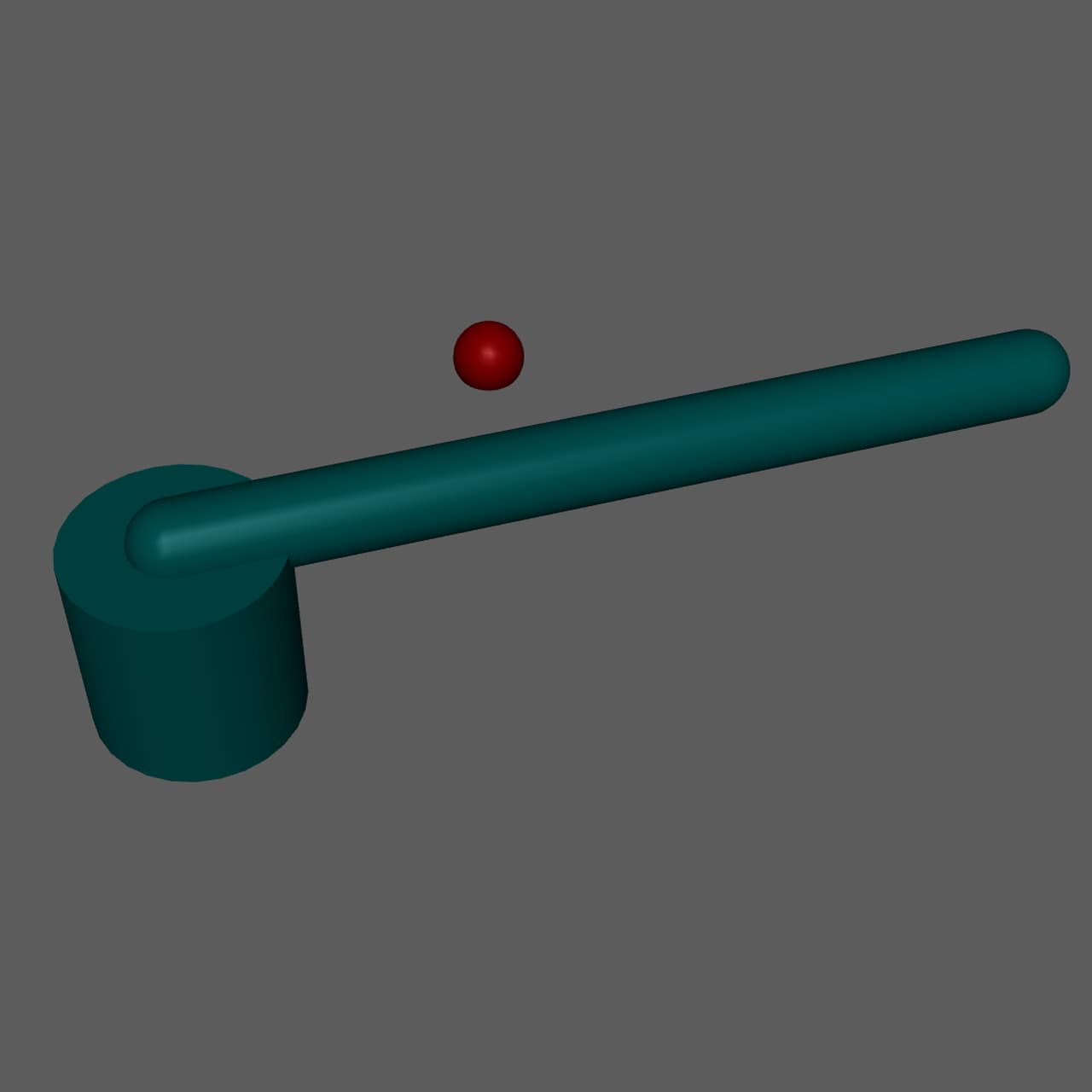
A simple 2 degree-of-freedom robotic arm designed for target reaching tasks. This beginner-friendly model is perfect for learning the basics of robotic control, inverse kinematics, and goal-oriented behavior. The arm must coordinate two joints to position its end-effector at randomly placed target locations. Widely used in reinforcement learning tutorials and educational settings.
Specifications
- Manufacturer
- Google DeepMind
- Type
- Robotic Arm
- Environment
- Simulated
- Category
- MuJoCo Physics Simulator
- Controller
- MuJoCo
- Sensors
- Joint positionJoint velocityTarget positionEnd effector position
- Actuators
- Position servoTorque control
- Connectivity
- ZMQLocal
Getting started
MuJoCo Reacher Integration Guide
Overview
The MuJoCo Reacher is a simple 2-DOF robotic arm designed for target reaching tasks. This beginner-friendly model is perfect for learning the fundamentals of robotic control, goal-oriented behavior, and inverse kinematics with FEAGI's neural circuits.
Model Specifications
- Degrees of Freedom: 2
- Actuators: 2 (shoulder joint, elbow joint)
- Task: Position the end-effector (fingertip) at a randomly placed target
- Control Frequency: 20 Hz
- Simulation Timestep: 0.01s
Sensory Capabilities
Joint Sensors
- Joint Position: Current angle of each joint (2 values)
- Joint Velocity: Angular velocity of each joint (2 values)
Task Sensors
- Target Position: XYZ coordinates of the target sphere
- End-Effector Position: XYZ coordinates of the fingertip
- Distance to Target: Scalar distance between fingertip and target
Motor Capabilities
Actuator Types
- Position Control: Direct joint angle targets (-π to +π)
- Torque Control: Direct torque commands (advanced)
Joint Ranges
- Shoulder joint: ±180° (full rotation)
- Elbow joint: ±180° (full rotation)
FEAGI Integration
Cortical Mapping
i_joint_position: 2 neurons (shoulder, elbow angles)i_joint_velocity: 2 neurons (angular velocities)i_target_position: 3 neurons (XYZ of target)i_fingertip_position: 3 neurons (XYZ of fingertip)i_distance_to_target: 1 neuron (scalar distance)
o_joint_control: 2 neurons (shoulder, elbow commands)
Neural Circuit Design Tips
- Goal-Oriented Behavior: Use target position to compute desired joint angles
- Error Reduction: Create circuits that reduce distance to target over time
- Inverse Kinematics: Learn the mapping from desired fingertip position to joint angles
- Smooth Motion: Implement velocity damping to avoid oscillations
Controller Setup
Prerequisites
- MuJoCo physics engine (included with controller)
- Python 3.8+
- FEAGI Python SDK
Installation
The generic MuJoCo controller handles all models. When launching the reacher:
python controller.py --model_xml reacher.xml --agent_id mujoco_reacher_01
Controller Parameters
--ip: FEAGI IP address (default: 127.0.0.1)--model_xml: Model file (reacher.xml)--agent_id: Unique agent identifier--cortical_input: Input cortical area name (default: i_vision)--cortical_output: Output cortical area name (default: o_motor)
Recommended Learning Tasks
Beginner
- Static Target: Reach a fixed target position
- Random Targets: Reach targets spawned at random locations
- Sequential Reaching: Reach multiple targets in sequence
Intermediate
- Smooth Trajectories: Minimize jerky movements while reaching
- Obstacle Avoidance: Reach target while avoiding obstacles
- Speed vs Accuracy: Balance reaching speed with final precision
Advanced
- Moving Targets: Track and reach targets that move
- Multi-Objective: Minimize time, energy, and error simultaneously
- Tool Use: Use the arm to manipulate other objects
Troubleshooting
Arm Spins Continuously
- Check joint angle ranges are wrapped correctly (-π to +π)
- Reduce motor command magnitudes
- Implement velocity damping in output layer
Cannot Reach Target
- Verify target is within workspace (reachable zone)
- Check joint position sensors are correctly normalized
- Ensure inverse kinematics mapping is learned
Oscillates Around Target
- Add velocity feedback to dampen oscillations
- Implement a "close enough" threshold to stop movement
- Reduce control frequency or increase damping
Resources
- MuJoCo Documentation: https://mujoco.readthedocs.io/
- FEAGI Documentation: https://feagi.org/docs
- Example Genomes: Check the FEAGI marketplace for pre-trained reaching controllers
Support
For integration questions or issues:
- Discord: https://discord.gg/feagi
- GitHub Issues: https://github.com/feagi/feagi
Connecting to FEAGI
MuJoCo Reacher - Connectivity
Connection Type
The MuJoCo Reacher runs on your local machine and connects to FEAGI via:
- ZMQ for sensory data (joint positions, velocities, orientation)
- ZMQ for motor commands (joint control signals)
- HTTP for registration and metadata
Network Requirements
Ports Used
- 5555: Sensory data (ZMQ PUB socket)
- 30005: Motor commands (ZMQ SUB socket)
- 30001: Agent registration (TCP)
Firewall Configuration
Ensure these ports are open for localhost communication:
# macOS
sudo pfctl -d  # Disable firewall temporarily for testing

# Linux
sudo ufw allow 5555
sudo ufw allow 30005
sudo ufw allow 30001

# Windows
# Open Windows Firewall settings and allow these ports
Controller Setup
Installation
The generic MuJoCo controller is installed once and can run any MuJoCo model.
- Navigate to Embodiment Explorer
- Select "MuJoCo Physics Simulator" category
- Click on "MuJoCo Reacher"
- Click "Launch" (controller installs automatically if needed)
# Clone controller repository
git clone https://github.com/feagi/embodiment-controllers.git
cd embodiment-controllers/simulators/mujoco

# Create Python virtual environment
python3 -m venv venv
source venv/bin/activate  # On Windows: venv\Scripts\activate

# Install dependencies
pip install -r requirements.txt

# Install FEAGI Python SDK
pip install feagi
Launch Command
# From controller directory with venv activated
python generic_controller.py \
  --model_xml reacher.xml \
  --agent_id mujoco_reacher_01 \
  --ip 127.0.0.1 \
  --cortical_input i_vision \
  --cortical_output o_motor
Configuration Options
| Parameter | Default | Description |
|---|---|---|
--ip | 127.0.0.1 | FEAGI host IP address |
--model_xml | (required) | MuJoCo model XML file |
--agent_id | (required) | Unique agent identifier |
--cortical_input | i_vision | Input cortical area name |
--cortical_output | o_motor | Output cortical area name |
Connection Process
- Startup: Controller loads MuJoCo model and initializes physics engine
- Check FEAGI: Verifies FEAGI is reachable on specified IP
- Register: Sends agent registration to FEAGI (port 30001)
- Establish ZMQ: Creates publisher (port 5555) and subscriber (port 30005)
- Simulation Loop:
- Reads joint states from MuJoCo
- Publishes sensory data to FEAGI
- Receives motor commands from FEAGI
- Applies commands to MuJoCo actuators
- Steps physics simulation at 120 Hz
Standalone Mode
- Physics simulation continues normally
- MuJoCo viewer allows manual joint manipulation
- No neural control (useful for testing physics)
To exit standalone and connect to FEAGI:
- Start FEAGI
- Restart the controller
Troubleshooting
"Connection refused" Error
- Verify FEAGI is running:
docker psor check FEAGI logs - Check IP address matches FEAGI host
- Ensure ports 5555, 30005, 30001 are not blocked
Model Freezes or Stops Responding
- Check FEAGI logs for errors
- Verify ZMQ sockets are not blocked by firewall
- Restart controller and FEAGI if connection is lost
Model Loads but No Neural Control
- Verify cortical area names match FEAGI genome
- Check motor commands are being published by FEAGI
- Review FEAGI logs for mapping errors
High Latency or Lag
- Reduce control frequency if CPU is overloaded
- Check network latency if FEAGI is remote
- Close unnecessary applications
Remote FEAGI Connection
To connect to FEAGI running on a different machine:
# Replace 127.0.0.1 with FEAGI host IP
python generic_controller.py \
  --model_xml reacher.xml \
  --agent_id mujoco_reacher_01 \
  --ip 192.168.1.100
Performance Optimization
For Best Performance:
- Run controller and FEAGI on the same machine (localhost)
- Close MuJoCo viewer if visual feedback not needed (headless mode)
- Reduce control frequency for complex genomes
- Use dedicated GPU for FEAGI neural computations
Support
For connectivity issues:
- Discord: https://discord.gg/feagi
- GitHub Issues: https://github.com/feagi/embodiment-controllers
View marketplace for this embodiment · Back to embodiment explorer